La feuille de style du template subSilver
body {
1. background-color: {T_BODY_BGCOLOR};
scrollbar-face-color: {T_TR_COLOR2};
scrollbar-highlight-color: {T_TD_COLOR2};
scrollbar-shadow-color: {T_TR_COLOR2};
scrollbar-3dlight-color: {T_TR_COLOR3};
scrollbar-arrow-color: {T_BODY_LINK};
scrollbar-track-color: {T_TR_COLOR1};
scrollbar-darkshadow-color: {T_TH_COLOR1};
}
Pour remplacer l'un des fonds par
une image , mettre :
pour le fond 1:
body {
background-image: url(url de l'image);
scrollbar-face-color: {T_TR_COLOR2};
scrollbar-highlight-color: {T_TD_COLOR2}; etc
pour le fond 2 :
bodyline { background-image: url(url de l'image);
Ceci est valable pour remplacer n'importe
lequel des background-color:
Attention toutefois a bien respecter le chemin
de votre image !
Si vous stockez votre image de fond dans le dossier images du template
subSilver par exemple, le chemin sera :
templates/subSilver/images/monimage.gif
font,th,td,p { font-family: {T_FONTFACE1} }
a:link,a:active,a:visited { color : {T_BODY_LINK}; }
a:hover { text-decoration: underline; color : {T_BODY_HLINK}; }
hr { height: 0px; border: solid {T_TR_COLOR3} 0px; border-top-width: 1px;}
/* This is the border line & background
colour round the entire page */
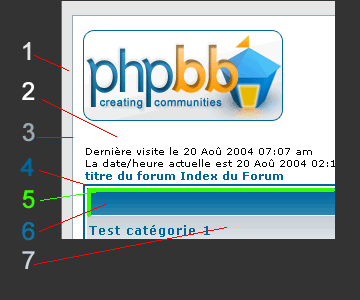
2 .bodyline { background-color: {T_TD_COLOR2};
3 border: 1px {T_TH_COLOR1} solid; }
8.forumline { background-color: {T_TD_COLOR2};
4 border: 2px {T_TH_COLOR2} solid; }
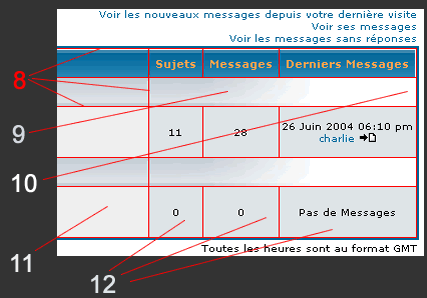
Le 8 est en fait la couleur de fond (backgroundcolor) de forumline
et non une bordure
Le 9 est une image cellpic2.jpg dégradée vers le
blanc.

Background-repeat: repeat-y; signifie que l'image est, si nécessaire
pour compléter la cellule, répétée verticalement
mais pas horizontalement
Repeat-x signifierait répétition horizontale mais pas
verticale
no-repeat signifie pas de répétition du tout.
Le 10 correspond à l'arrière-plan de la cellule
et vient donc "compléter" l'espace non rempli par le
cellpic2.
11 td.row1 { background-color: {T_TR_COLOR1}; }
12 td.row2 { background-color: {T_TR_COLOR2}; }
td.row3 { background-color: {T_TR_COLOR3}; }
By default this is the fading out gradiated silver background.
However, you could replace this with a bitmap specific for each forum*/
td.rowpic {
10 background-color: {T_TD_COLOR2};
9 background-image: url(templates/subSilver/images/{T_TH_CLASS3});
background-repeat: repeat-y;
/* Header cells - the blue and silver gradient
backgrounds */
th {
color: {T_FONTCOLOR3}; font-size: {T_FONTSIZE2}px; font-weight : bold;
background-color: {T_BODY_LINK}; height: 25px;
6 background-image: url(templates/subSilver/images/{T_TH_CLASS2});
td.cat,td.catHead,td.catSides,td.catLeft,td.catRight,td.catBottom {
7 background-image: url(templates/subSilver/images/{T_TH_CLASS1});
background-color:{T_TR_COLOR3}; border: {T_TH_COLOR3}; border-style: solid;
height: 28px;
}
td.cat,td.catHead,td.catBottom {
height: 29px;
border-width: 0px 0px 0px 0px;
}
th.thHead,th.thSides,th.thTop,th.thLeft,th.thRight,
th.thBottom,th.thCornerL,th.thCornerR {
font-weight: bold;
5 border: {T_TD_COLOR2}; border-style: solid; height: 28px;
}
13 td.row3Right,td.spaceRow {
background-color: {T_TR_COLOR3}; border: {T_TH_COLOR3}; border-style: solid;
}
th.thHead,td.catHead { font-size: {T_FONTSIZE3}px; border-width: 1px
1px 0px 1px; }
14 th.thSides,td.catSides,td.spaceRow { border-width:
0px 1px 0px 1px; }
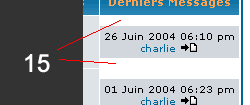
15 th.thRight,td.catRight,td.row3Right
{ border-width: 0px 1px 0px 0px; }
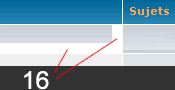
16 th.thLeft,td.catLeft { border-width:
0px 0px 0px 1px; }
17 th.thBottom,td.catBottom { border-width:
0px 1px 1px 1px; }
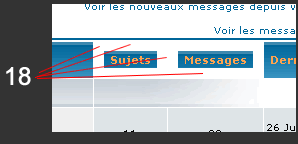
18 th.thTop { border-width: 1px 0px 0px
0px; }
19 th.thCornerL { border-width: 1px 0px
0px 1px; }
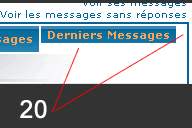
20 th.thCornerR { border-width: 1px 1px
0px 0px; }

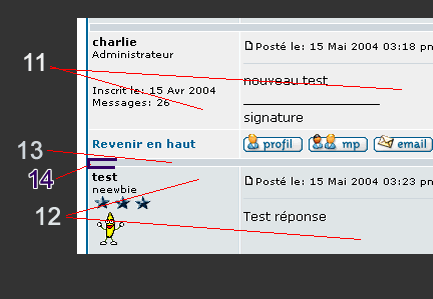
14 règle l'épaisseur de l'espace autour de la barre 13